
Manage your VPS servers from your Mac
Keelwatch is a native macOS app that watches your whole fleet, warns you before things break, and lets you fix them over SSH without opening a single dashboard.
macOS 12 or later · Apple Silicon and Intel · Signed and notarized by Apple
Your servers, at a glance and at your fingertips
Works with any Linux VPS you can reach over SSH: Hetzner, DigitalOcean, Vultr, Lightsail, Linode, OVH, your own boxes and more.
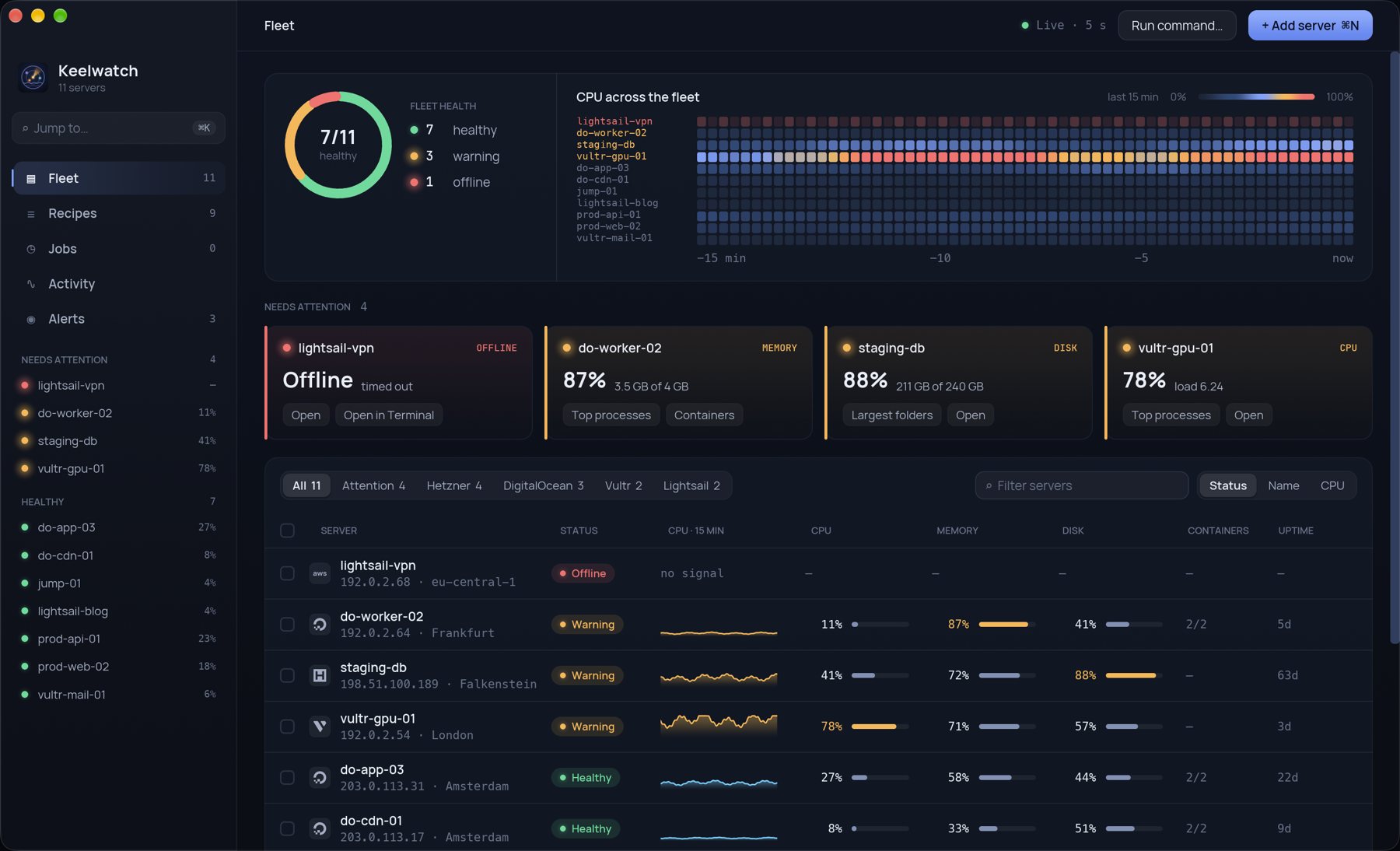
Fleet overview
CPU, memory, disk and bandwidth for every server, live. Look back over the last hour, 24 hours or 7 days.
Alerts that reach you
macOS notifications when a server goes offline, a disk fills up, or memory and CPU stay high. Open alerts sit in the menu bar.
Domains and SSL
See and edit sites on nginx, Caddy, Apache and Traefik. Add a domain, set up a redirect or a reverse proxy, and issue certificates.
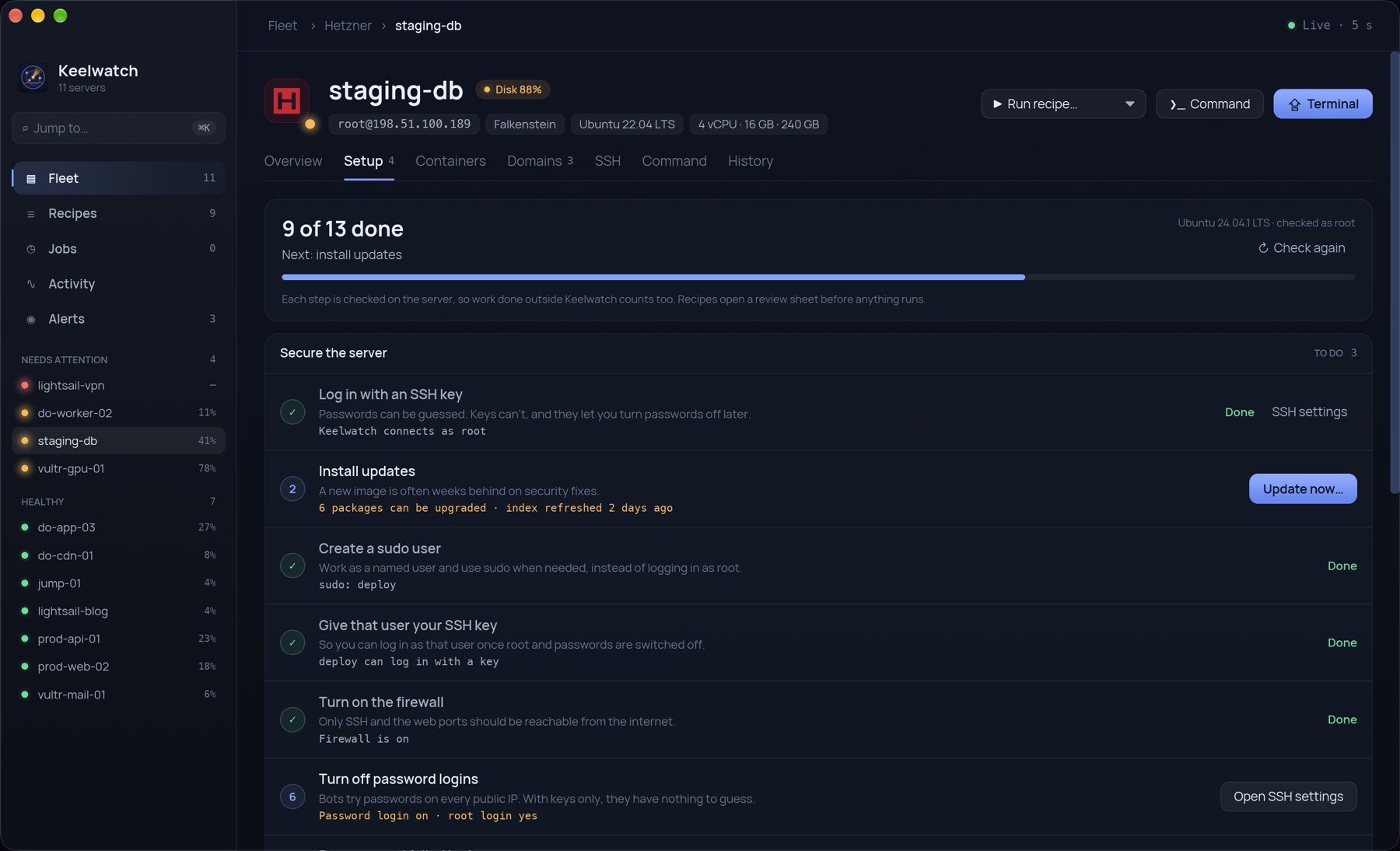
New server setup
A 13-step first-day checklist takes a fresh VPS to a safe, running state: SSH key login, updates, a sudo user, firewall, fail2ban, automatic security patches, swap, Docker, a web server and a domain with HTTPS.
SSH keys and hardening
Manage authorized keys, turn off password and root logins, and check the SSH daemon settings on each server.
Jobs and live logs
Run commands and recipes across one server or many, follow output as it streams, and keep a history of what ran, where and how it ended.
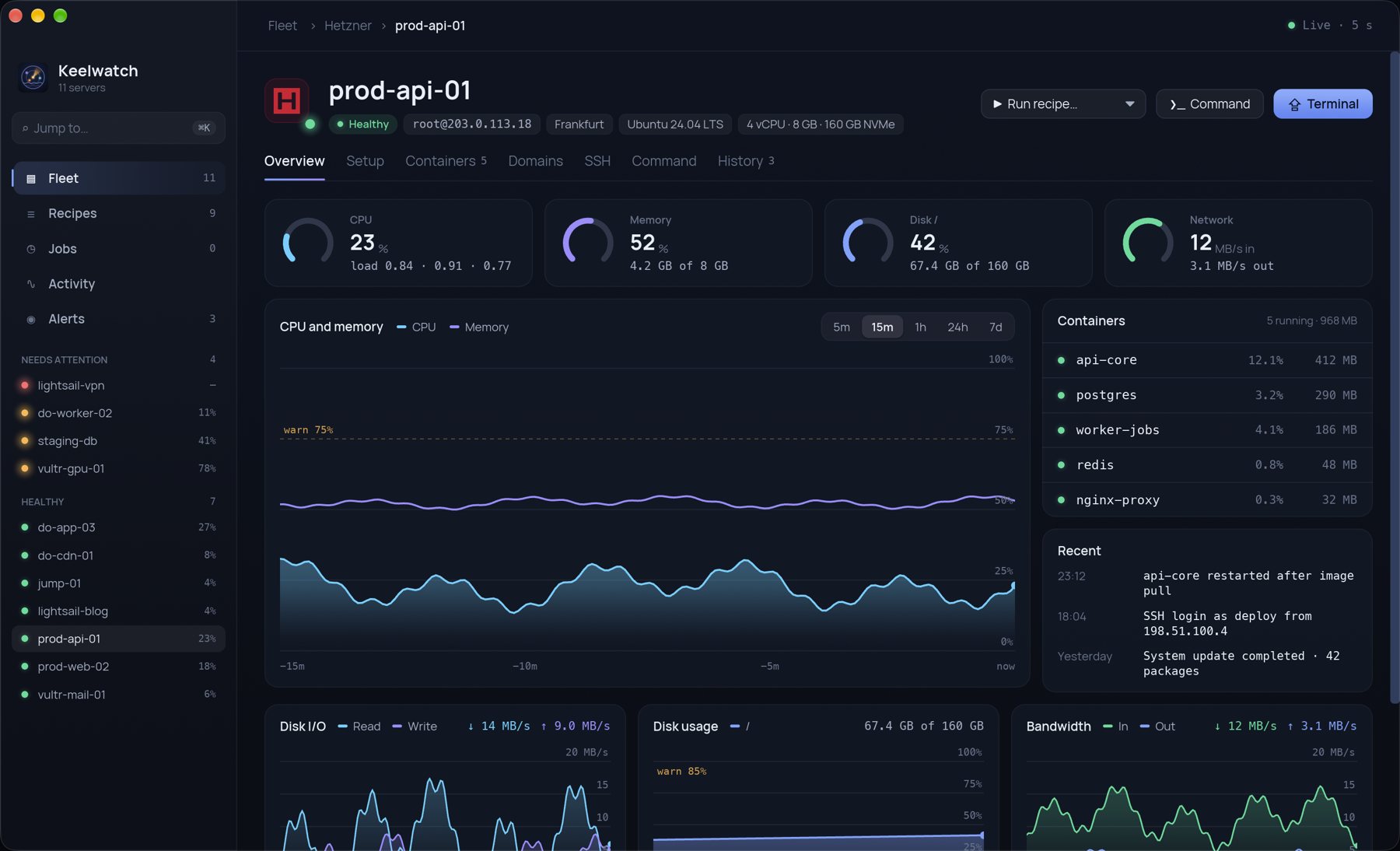
Everything about one server, on one page
Open any server to see its charts, processes, containers, disks, domains and SSH settings side by side.
- CPU, memory, disk I/O, disk usage and bandwidth charts
- Top processes, Docker containers and largest folders
- Open a Terminal session with one click
From a fresh VPS to production-ready
Keelwatch checks what a new server is missing and fixes each step for you, with the exact commands shown before they run.
- 13 checks, from SSH keys and a firewall to a domain with HTTPS
- Each step shows its status and a one-click fix
- Re-check any time to see what drifted
No cloud in the middle
Keelwatch talks to your servers directly from your Mac. There is no Keelwatch account, no agent to install and no server of ours your data passes through.
Credentials in your Keychain
Passwords and key passphrases are stored in the macOS Keychain, never in plain files.
Plain SSH, nothing to install
Keelwatch uses standard SSH and the tools already on your server. Your existing keys and ~/.ssh/config just work.
Your data stays on your Mac
Metrics history and activity are kept in a local database. No telemetry, no analytics.
Jump anywhere with ⌘ K
Open any server, screen or action from one palette. ⌘ N adds a server, and every common action has a shortcut.
Get Keelwatch for your Mac
Checkout is handled securely by Polar. You get the download link and your license by email right after purchase.
- macOS 12 Monterey or later
- Apple Silicon and Intel
- Any Linux server with SSH
Prices include applicable taxes · 14-day refund policy
Questions
Do I need to install anything on my servers?
No. Keelwatch connects over SSH and reads standard Linux tools such as /proc, df and systemctl. Nothing runs on your server when Keelwatch is closed.
Which servers does it work with?
Any Linux server you can SSH into, from any provider. Setup steps are written for Ubuntu and Debian; monitoring works on most distributions.
Where are my passwords and keys stored?
In your macOS Keychain. Keelwatch never sends them anywhere except to your own server during the SSH login.
Does Keelwatch send my data to you?
No. There are no accounts, no analytics and no telemetry. See the Privacy Policy.
Who handles payment and invoices?
Polar (polar.sh) is our merchant of record. Polar processes your payment, handles sales tax and VAT, and sends your receipt.
Can I get a refund?
Yes, within 14 days of purchase. See the Refund Policy.